
49 Minutes: Anatomy of a Business Email Compromise
At 12:51 PM on a Thursday in August, a manufacturer sent 543 of its customers, suppliers and general contractors an invitation to bid on a materials package.
Except the company didn't send it. Someone in Virginia did, from the company's own mailbox, using the company's own signature block — right down to the notice about the office being closed for renovations that week.
By 2:27 PM that same afternoon, the intruder was locked out permanently. By 6:24 PM, all 543 recipients had been warned. Here is exactly how that happened, minute by minute, because the details are where the lessons live.
It started with an email from someone they knew
Seven days earlier, at 12:41 PM on a Thursday, the company's shared info@ mailbox received a message titled "Request For Bid." It came from a general contractor they had worked with — a real person, at a real company, from their real email address (d*******@a*********renovations.com). Nothing about the sender was forged.
The message contained a button: SUBMIT YOUR BID →. It led to a document-sharing page hosted on a free Webflow subdomain, which in turn presented a Google sign-in screen.
An employee clicked it, hit the sign-in page, and entered the mailbox password. We know this because that employee replied to the contractor the same day, in good faith: "we are trying to download the documents and are being redirected to google sign-in. Even after signing in, the documents do not appear to download."
They didn't download because there were no documents. The page existed to collect one thing, and it got it.
This is the part most security training gets wrong. The advice is "don't click links in suspicious emails." This email wasn't suspicious. It came from a known contact, at a known company, about a completely ordinary business activity, in an industry where unsolicited bid invitations arrive weekly. The contractor's own account had been compromised first, and the attacker was simply walking down that contact list — turning each victim into the next credible sender.
Seven days of nothing
At 8:28 PM that same evening, the attacker logged in from 45.58.218.205 — a residential Charter Communications address in Leesburg, Virginia. The password worked. There was no two-step verification on the account to stop them.
Then they waited.
They came back on Saturday the 23rd at 3:08 PM to re-authenticate, and did nothing else. No emails sent, no files touched, no settings changed. Seven days of a stranger reading a company's inbox — quotes, invoices, customer lists, pricing — with nobody aware.
Dormancy is deliberate. It builds a picture: who signs off on payments, how the company writes, which relationships are warm, when the office is quiet. The renovation notice in the signature block wasn't decoration; it was a detail that made the eventual fraud read as authentic.
Thursday, 12:46 PM
The attack ran on a schedule that looks a lot like a job.
- 12:46 PM — a single test message to one recipient. Confirm the send works, confirm it lands.
- 12:51 PM — the blast. 543 unique external recipients in two batches. 537 delivered.
- 12:52 PM — one minute later, they added a Gmail block on
[email protected].
That third step is the one to sit with. Bounce notifications are how an ordinary user discovers that their account has sent mail they don't recognize. By blocking the mail-delivery daemon, the attacker deleted the alarm — buying silence that held for roughly an hour.
- 12:54 PM to 1:06 PM — five recipients replied to the bid invitation. The attacker answered each of them personally, from the real mailbox, pushing the phishing link further. Real conversations, with real business partners, conducted by a stranger wearing the company's name.
The company found out the way most companies find out: a partner said something, and an employee noticed the account behaving strangely.
- 1:07:46 PM — staff changed the mailbox password.
- 1:08:11 PM — the attacker's next login attempt failed. Twenty-two seconds.
Why the password change wasn't the fix
It felt like the fix. It wasn't, and this is the single most valuable thing in this story for any business owner reading it.
Changing a password invalidates future logins. It does not, on its own, kill sessions that are already open, and it does not touch third-party applications that were authorized before the change. An attacker with a live browser session or a connected app keeps working straight through a password reset.
The incident reached our service desk at 1:38 PM. Investigation started immediately.
- 2:19 PM to 2:27 PM — containment. Every active sign-in session was force-terminated across all devices, and all five connected third-party OAuth applications were revoked. One of them had been authorized at 1:25 PM that day — 34 minutes after the blast — with access to mail, contacts, files and calendar. Whether it was attacker persistence or a staff member reconnecting Outlook after the reset, it didn't survive the review.
Attacker access was fully severed at 2:27 PM — 49 minutes after we were engaged.
- 2:47 PM to 2:48 PM — integrity sweep of the mailbox. No hidden forwarding rules. No unauthorized delegates. No malicious filters. No rogue "send mail as" identities. Clean.
- 3:46 PM to 3:55 PM — hardening. Two-step verification enrolled and enforced. Legacy POP access, enabled and unused since the account was created, switched off. The attacker's bounce-suppression block removed — the last artifact left behind. The workstation tied to the mailbox was independently verified clean by endpoint security.
The blast radius is your customers
Containment protects the account. It does nothing for the 543 companies now holding a credential-harvesting link that appears to have come from a trusted supplier.
A recipient notification was drafted, sent to the client's leadership for written approval, and approved that afternoon. Starting at 6:17 PM — the same day — it went out in six blind-copied batches, finishing at 6:24 PM. Every message was verified in the sent folder.
The next morning, two more things happened that we'd argue are the difference between closing a ticket and actually resolving an incident:
- We contacted the general contractor whose compromised account started this — a company that isn't our client, has no contract with us, and owed us nothing — to explain that their account was being used against their own contact list, and how to secure it.
- We wrote directly to the five recipients who had corresponded with the attacker, explaining that those replies weren't from the company they thought, and what to do if they'd entered a password.
What actually caused this
Not one thing. Four, stacked:
- A shared mailbox with a shared password. Multiple staff, one credential, no accountability trail. Nobody's account, so nobody's responsibility.
- No two-step verification. A stolen password was sufficient and complete.
- A trusted-sender lure. No spam filter flags a legitimate email from a legitimate contact.
- No detection layer. The only alarm was a bounce notification, and the attacker turned it off.
The remediation followed the same list: two-step verification enforced across every account, shared-password access replaced with proper mailbox delegation so each person signs in as themselves, and an advanced email security layer recommended and quoted.
One more thing surfaced during the audit that had nothing to do with the attack. A second company domain used as a sending identity had two SPF records published at once — a configuration error that invalidates both — no DKIM signing, and no DMARC policy at all. In practice, anyone on the internet could have sent email as that domain and had it delivered. We found it, published a DMARC policy, and put it under monitoring.
If you're reading this and recognizing your own setup
Ask three questions today:
- Does every mailbox in the business have two-step verification enforced — including the shared ones? The shared ones are the ones that don't.
- Do you know what "containment" means at your provider? If the answer to a compromise is "we reset the password," sessions and connected apps are still open.
- Can your IT partner produce a timeline? Not a summary — a timeline, with timestamps, source IPs, and what was done at each one. If they can't reconstruct it, they can't prove what the attacker did or didn't reach.
We contain first, then investigate, then notify, then harden — and we document all of it, because the report is what your customers, your insurer and your attorney will eventually ask for.
If you'd like us to review how your email is secured, get in touch: [email protected] or 772-254-7114.
Details in this article have been anonymized. Timestamps, actions and technical findings are drawn from the actual incident record.
Anatomy of a Phishing Email: The USPS Delivery Exception Scam
Yesterday I received the email below. It looks close enough to a legitimate USPS notice that a hurried person could easily click through — and that’s exactly the point. Phishing works because it exploits time pressure and pattern recognition, not because it’s technically sophisticated.
I’m sharing it here so you and your team can see the tells in the wild. Take thirty seconds to walk through it with me.
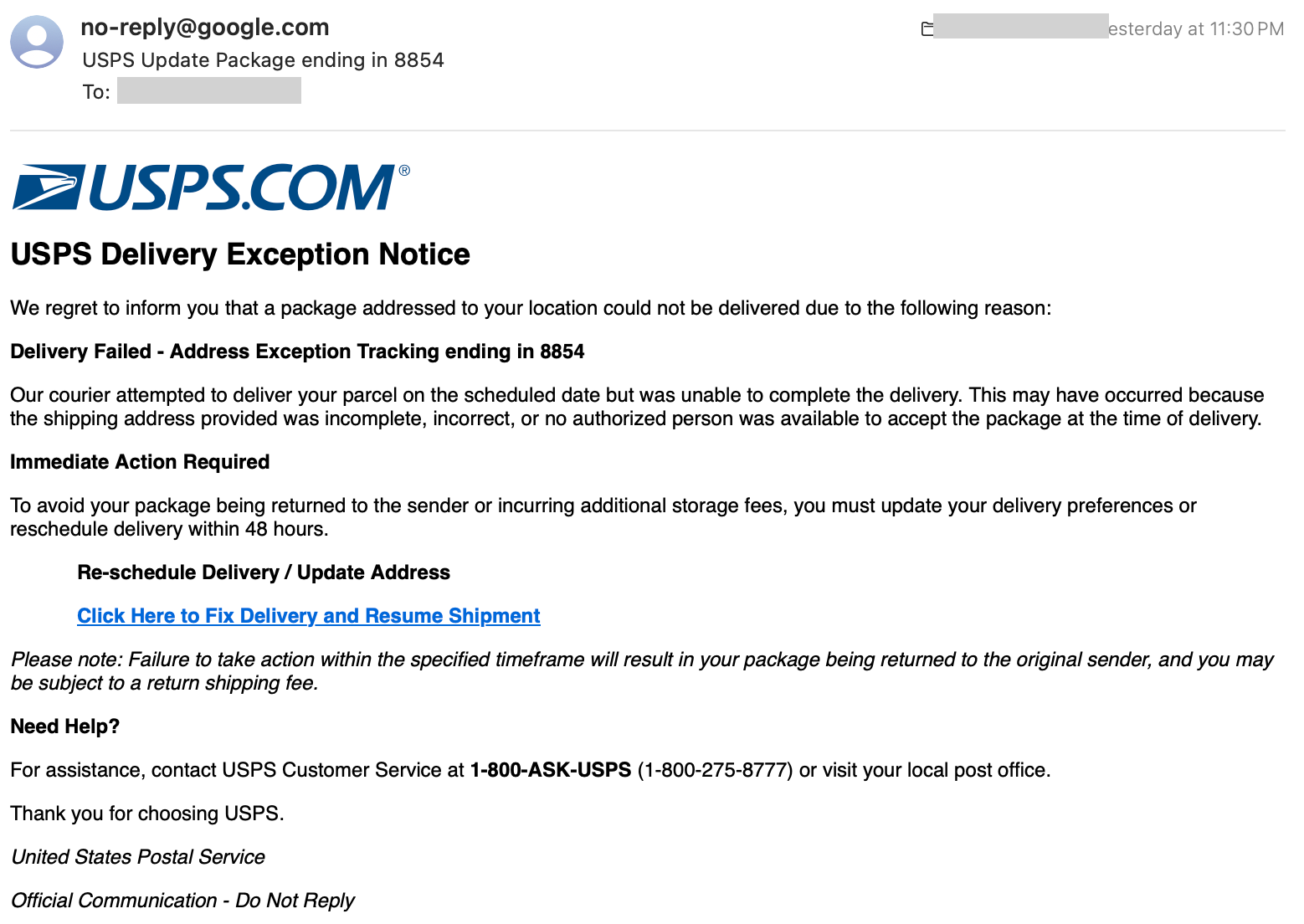
The email, transcribed
USPS Delivery Exception Notice
We regret to inform you that a package addressed to your location could not be delivered due to the following reason:
Delivery Failed – Address Exception Tracking ending in 8854
Our courier attempted to deliver your parcel on the scheduled date but was unable to complete the delivery. This may have occurred because the shipping address provided was incomplete, incorrect, or no authorized person was available to accept the package at the time of delivery.
Immediate Action Required
To avoid your package being returned to the sender or incurring additional storage fees, you must update your delivery preferences or reschedule delivery within 48 hours.
Re-schedule Delivery / Update Address
Click Here to Fix Delivery and Resume Shipment → https ://cuisinieng .icu/TylerBaker7651Please note: Failure to take action within the specified timeframe will result in your package being returned to the original sender, and you may be subject to a return shipping fee.
Need Help?
For assistance, contact USPS Customer Service at 1-800-ASK-USPS (1-800-275-8777) or visit your local post office.
Looks convincing at a glance. Now here’s what’s wrong with it.
Five red flags
1. The “From” address is wrong
The sender is [email protected]. USPS does not send delivery notifications from a Google address. Real USPS notifications come from @usps.com domains (typically @email.usps.com or @informeddelivery.usps.com).
Whenever an email claims to be from a specific company, glance at the actual sending domain before anything else. That one check catches the majority of phishing attempts.
2. The threat of a fee that doesn’t exist
The email says if you don’t click the link, your package will be returned to the sender and you may be charged a return fee. This is not how USPS works. The Postal Service does not charge recipients when an undeliverable package is returned. That “fee” exists purely to scare you into clicking.
Any email that threatens you with a financial penalty for inaction deserves extra scrutiny.
3. There’s no real tracking number
Legitimate USPS notifications include the actual tracking number — a 20-to-22-digit string you can paste into usps.com and verify. This email says “Tracking ending in 8854” and stops there. That’s because the sender has no tracking number to give you. They’re hoping the last four digits feel specific enough to seem real.
If a shipping notification won’t tell you the full tracking number, it isn’t a shipping notification.
4. “Immediate Action Required” — the artificial deadline
“Update your delivery preferences within 48 hours.” This is textbook social engineering. Every phishing email leans on urgency because a rushed person is a distracted person. When you’re worried about a deadline, you don’t stop to check the “From” address or hover over the link.
Real delivery services almost never impose 48-hour ultimatums on you. When you see a countdown clock in an email, slow down — that’s exactly what the attacker doesn’t want you to do.
5. Real details mixed in to build trust
Notice that the email lists the actual USPS customer service number: 1-800-ASK-USPS (1-800-275-8777). That number is genuine. It’s included specifically to give the message an air of legitimacy. Anyone who Googles the number to check will find that it matches — and feel reassured.
This is a common phishing technique: surround the malicious payload (the fake link) with authentic-looking details (real phone numbers, real logos, real address formats) so the whole thing feels legitimate. The link itself is where the attack lives; everything around it is stage dressing.
The link itself: the smoking gun
The “Click Here to Fix Delivery” button in the email points to https ://cuisinieng .icu/TylerBaker7651.
cuisinieng.icu— not a USPS domain. Not remotely close to one..icu— a cheap top-level domain frequently used for throwaway phishing sites./TylerBaker7651— a per-victim path, so the attacker can track who clicked.
Before you click any link in an email, hover over it (on a computer) or long-press it (on a phone) to preview the real destination. If the domain doesn’t match the company the email claims to be from, don’t click.
What to do if you get one of these
- Don’t click the link. Not even out of curiosity.
- Don’t reply. Confirming your address is active is valuable to attackers.
- Report it. Forward suspicious USPS-branded emails to spam@uspis.gov (the U.S. Postal Inspection Service). You can also report phishing to the FTC at reportphishing@apwg.org.
- Delete it.
- If you’re actually expecting a package, go directly to
usps.com(type it yourself, don’t click) and enter your tracking number there.
What to do if you already clicked
- If you only landed on a page and didn’t enter anything: close the tab and clear your browser cache. You’re likely fine, but run an antivirus scan to be safe.
- If you entered personal info (name, address, phone): watch for follow-up scam calls and texts.
- If you entered payment info: contact your bank or card issuer immediately to freeze the card, and monitor statements for at least the next 60 days.
- If you’re an Adaptive IT client: call us. Don’t wait to see if something bad happens. We’d much rather help you get ahead of it. Not a client yet? Reach out anyway — see the contact info below.
The bigger picture
Phishing volumes are up sharply this year, and the shipping-notification pretext is one of the most effective — everyone is expecting something in the mail, so a fake delivery notice feels plausible on any given day.
The good news is that once you’ve seen a few of these, the pattern becomes obvious. The same five tells — wrong sender, invented fees, missing tracking numbers, artificial urgency, and legitimate details sprinkled in as cover — show up in the vast majority of attacks. Train yourself and your team to look for them, and you’ll catch almost everything.
If you’d like Adaptive IT to run phishing-awareness training for your organization, or you want to review your inbox filtering and security posture, get in touch. It’s one of the highest-ROI things a small business can do.
Stay skeptical out there.
More from Scam Watch
This post is part of Scam Watch, our ongoing series where we publish real phishing, vishing, and fraud attempts as they hit us and our customers.
- Scam Watch: Fake “AT&T DirecTV” Robocall from (872) 213-9532 — the exact same urgency-driven social engineering playbook, delivered by phone instead of email.
Have you received a similar scam? Forward it to us at sales@getadaptiveit.com — we track the ones circulating in our clients’ inboxes so we can update filtering rules and warn everyone else.
— Adaptive IT
Scam Watch: Fake “AT&T DirecTV” Robocall from (872) 213-9532
Welcome to Scam Watch, an ongoing series from Adaptive IT where we publish real phishing, vishing, and fraud attempts as they hit us and our customers. The goal is simple: if you can recognize the pattern, you can hang up before it costs you anything.
The Call
On May 22, 2026 at 12:56pm, a call came in from (872) 213-9532. The caller left this voicemail:
“Hello, this is Rachel from AT&T DirectTV. I am leaving you this urgent voicemail that your 50% discount on monthly bill will expire tonight. If I do not receive your call today, this change will be permanent. Please call us back on the number showing on your caller ID to prevent this change. Thank you.”
Why we’re sure this is a scam
- “AT&T DirecTV” isn’t a thing. AT&T divested DirecTV back in 2021 — they’re separate companies now. Anyone smashing the two brand names together in 2026 is either deeply out of date or, more likely, hoping you don’t notice.
- Urgency is the oldest trick in the book. “Urgent voicemail.” “Expires tonight.” “Permanent if you don’t call today.” Real billing departments don’t operate on a clock designed to panic you.
- “Call back the number on your caller ID” is the giant red flag. This is the single biggest tell. Caller ID is trivially spoofed — calling it back guarantees you reach the scammer, not the real company. Legitimate businesses route you through their published main customer service line, the one printed on your bill or on their official website.
- 872 area code is Chicago. AT&T and DIRECTV customer service doesn’t route through a random Chicago mobile number.
- No account-specific details. A real retention call would reference your account, your plan, the last four of something. This is a generic script blasted to thousands of numbers.
What to do if you get a call like this
- Don’t call the number back. Even just to “tell them off” — it confirms your number is live and you’ll get more.
- If you’re an actual AT&T or DIRECTV customer and you’re worried, call the number printed on your most recent bill or look it up on att.com / directv.com directly. Never use the number the scammer gave you.
- Report it. The FTC takes scam reports at reportfraud.ftc.gov, and the FCC tracks robocalls at fcc.gov. Reports help carriers block the spoofing patterns.
- Block and move on. On iPhone and Android you can block the number directly from the recent calls list.
A note for businesses
Most successful breaches still start with a phone call or an email, not a Hollywood-style hack. If your team handles customer data, billing, or vendor payments, a 30-minute “what does a scam call sound like” briefing is one of the cheapest cybersecurity investments you can make. We do this kind of awareness training for our managed customers as part of normal service — reach out if you want to talk about it.
We’ll keep adding to Scam Watch as new ones come in. If you receive a scam call, text, or email and you want it featured here (with everything sensitive redacted), forward it to us.
More from Scam Watch
- Anatomy of a Phishing Email: The USPS Delivery Exception Scam — a fake USPS delivery notice we received in July 2026, dissected line by line. Same social-engineering playbook as the call above, just delivered by email.
— Adaptive IT