
This is part 4 of our 8-week series, 8 Types of Cyber Attacks: one plain-English breakdown every Monday of how small businesses actually get hit, and what stops it.
Your bookkeeper gets an email from a long-time vendor. It’s in the same thread you’ve been using for months, it references the right invoice number, and the tone sounds exactly like them. The only new detail: “We’ve changed banks, please use the updated wiring instructions attached.” The money goes out Friday. The real vendor calls the next week asking where their payment is.
Nobody guessed a password. Nobody clicked a strange attachment. Someone was quietly sitting in the middle of the conversation, reading along and waiting for the right moment to change one detail. That’s a man-in-the-middle attack.
What a man-in-the-middle attack actually is
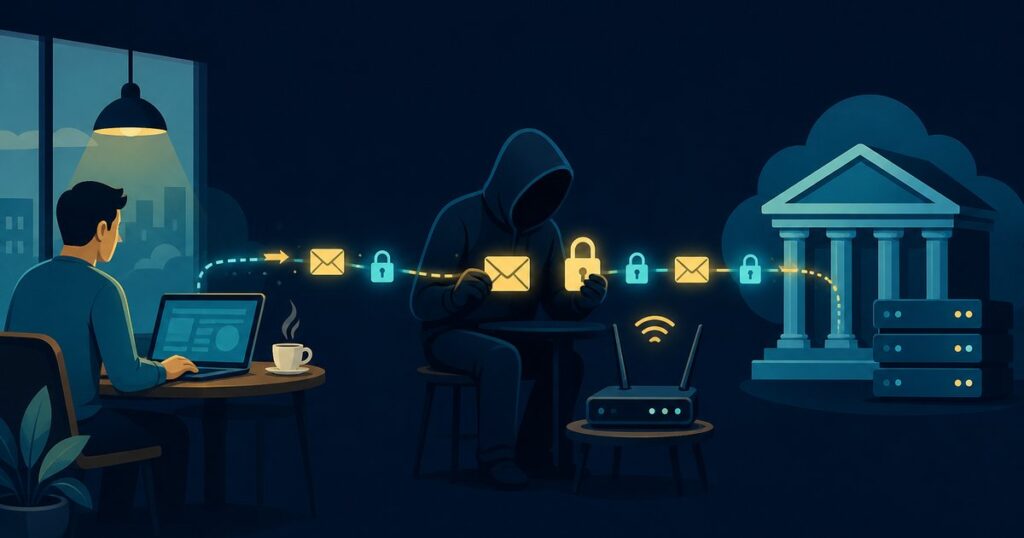
In a man-in-the-middle (MitM) attack, the attacker gets between you and whoever you think you’re talking to: a website, your bank, Microsoft 365, or another person over email. Your traffic still reaches the real destination, so everything looks normal. But on the way, the attacker can read it, copy it, or change it.
The money involved is real. The FBI’s Internet Crime Complaint Center reported nearly $2.77 billion in losses to business email compromise in 2024, and many of those cases start with an attacker sitting inside an email conversation or a stolen login session.
Three ways attackers get in the middle
- Fake or compromised Wi-Fi. A hotspot named “Airport_Free_WiFi” or the coffee shop’s name can be run from a laptop in a backpack. Connect to it, and every request you make passes through that laptop first. The same thing happens with an old office router that hasn’t been patched in years. (We covered one real example in Russia’s military hackers hijacked home-office routers across 23 states.)
- Fake login pages that relay to the real one. This is called an adversary-in-the-middle (AiTM) phishing attack. You click a link, see what looks like the Microsoft 365 sign-in page, enter your password, and even approve the MFA prompt. The fake page passes all of it to the real Microsoft and keeps the session cookie for itself. Now the attacker is logged in as you, and MFA already said yes. (More on spotting these: Phishing: the cyber attack that starts in your inbox.)
- Hijacked email threads. Once they have one mailbox, theirs or a vendor’s, attackers set up quiet forwarding rules and read along for weeks. When an invoice or a closing comes up, they step in with “updated” bank details, sometimes from a lookalike domain that’s one letter off.
“A man-in-the-middle attack doesn’t break your lock. It stands next to you while you open it.”
— Glenn Kupsch, President, Adaptive IT
Why small businesses are a good target
- Payments move by email. Invoices, payroll changes, and real estate or title wires are often approved over a reply-all.
- People work from everywhere. Hotels, airports, coffee shops, and home networks nobody at the company manages.
- Basic MFA is treated as the finish line. Text-message codes and push approvals stop most password attacks, but not a fake login page relaying in real time.
- Nobody is watching the sign-ins. A login from another country at 3 AM looks the same as yours unless something is set up to flag it.
What actually stops it
The goal is to make the middle a dead end: even if someone gets between you and the other side, there’s nothing useful to steal and no way to change what matters.
- Phishing-resistant MFA and Conditional Access. Passkeys, the Microsoft Authenticator app with number matching, and rules that only allow sign-ins from company devices and expected locations make stolen passwords and relayed logins far less useful.
- Sign-in and mailbox monitoring. Alerts for impossible travel, new inbox forwarding rules, and logins from unfamiliar devices catch a hijacked mailbox before the wire goes out.
- Secure business Wi-Fi. A properly configured, patched firewall and access points, WPA3 encryption, and a guest network that is separate from the one your computers and printers live on.
- Safe connections on the road. Use your phone’s hotspot or a company VPN instead of public Wi-Fi. Never ignore a browser warning about a certificate or an insecure connection.
- A call-back rule for money. Any change to bank details, any new wire, any “urgent” payment request gets verified by phone, using a number you already have on file, not the one in the email.
- Email authentication on your own domain. SPF, DKIM, and DMARC make it much harder for someone to send email that looks like it came from you.
Not sure where you stand?
Adaptive IT offers a Cyber Review for small businesses: a straightforward look at your MFA setup, Microsoft 365 sign-in protections, email security, Wi-Fi and firewall configuration, and the gaps an attacker would use first. You get a plain-English list of what to fix, in order.
Call the Adaptive IT service desk at (877) 958-1248 or get in touch here.
Next Monday in the series: SQL Injection. How a single web form can hand over an entire customer database, and what to ask whoever built your website.